Supabase Auth Hook
Supabase OTP with Bar9
Deliver Supabase Auth phone codes through a signed Send SMS Hook and Bar9.
Enabling SMS-Hook
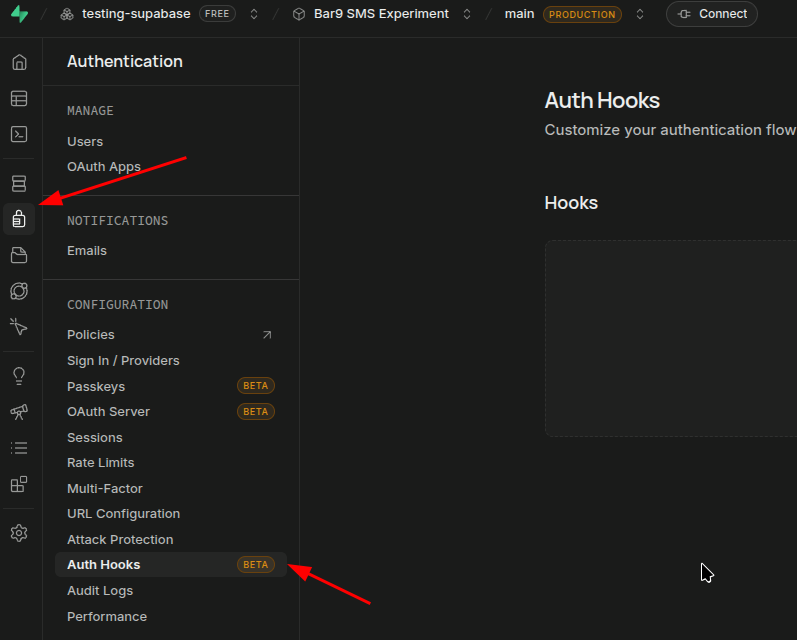
- Access the Auth Hooks dashboard.
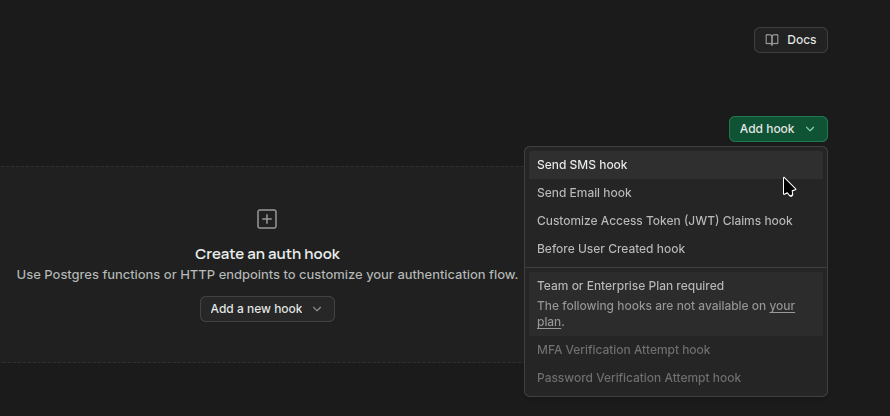
- Click on "Add Hook" and select Send SMS Hook.
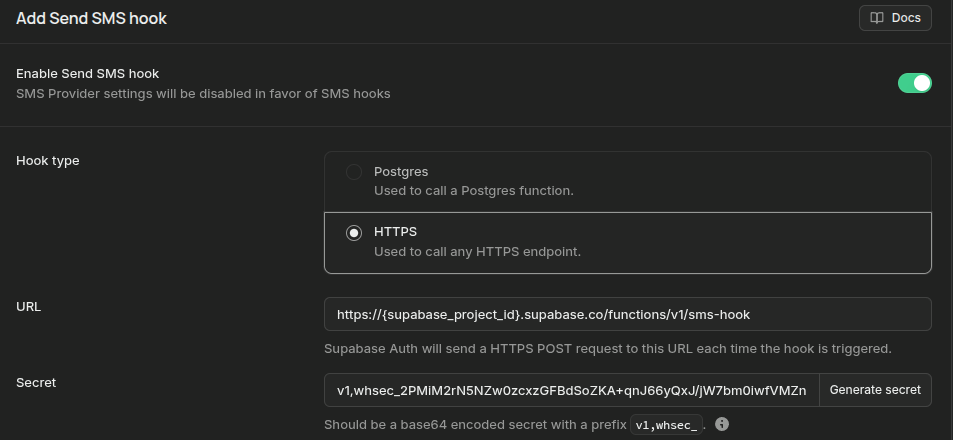
- Toggle on "Enable Send SMS hook".
- Make sure to select HTTPS as Hook Type.
- Use the following URL:
https://{supabase_project_id}.supabase.co/functions/v1/sms-hook
- Generate and save the secret key.
Implementing the SMS Hook Edge Function in Supabase
- Supabase Auth generates, stores, and verifies the OTP. Bar9 only delivers the SMS using the
/v1/messages endpoint.
- Install the Supabase CLI.
- Authenticate with your Supabase account.
- List your Supabase projects to find the Reference ID of your project.
supabase projects list
- Link the current directory to the Supabase project.
supabase link --project-ref <project_reference_id>
- Create an SMS Hook Edge Function.
supabase functions new sms-hook
- Edit the newly created
sms-hook function at supabase/functions/sms-hook/index.ts, adding the Bar9 SMS sending logic.
import { Webhook } from 'https://esm.sh/[email protected]';

const json = (body: unknown, status = 200) =>
	new Response(JSON.stringify(body), {
		status,
		headers: { 'Content-Type': 'application/json' }
	});

Deno.serve(async (request) => {
	const payload = await request.text();
	const hookSecret = Deno.env.get('SEND_SMS_HOOK_SECRET') ?? '';
	const secret = hookSecret.replace(/^v1,whsec_/, '');

	let event: {
		user: { phone: string };
		sms: { otp: string };
	};

	try {
		const webhook = new Webhook(secret);
		event = webhook.verify(payload, Object.fromEntries(request.headers)) as typeof event;
	} catch {
		return json({ error: { http_code: 401, message: 'Invalid Send SMS Hook signature' } }, 401);
	}

	const response = await fetch('https://api.bar9.dev/v1/messages', {
		method: 'POST',
		headers: {
			Authorization: `Bearer ${Deno.env.get('BAR9_API_KEY')}`,
			'Content-Type': 'application/json'
		},
		body: JSON.stringify({
			to: event.user.phone,
			template_id: Deno.env.get('BAR9_SUPABASE_OTP_TEMPLATE_ID'),
			language: 'en',
			variables: { code: event.sms.otp }
		})
	});

	if (!response.ok) {
		const result = await response.json().catch(() => ({}));
		return json(
			{
				error: {
					http_code: response.status,
					message: result.error?.message ?? 'Bar9 rejected the SMS'
				}
			},
			502
		);
	}

	return json({});
});
Configuring and Deploying the Edge Function
- Create a Bar9 API key with the
sms:send scope.
- Store the Bar9 API key and the SMS Hook secret in Supabase.
supabase secrets set BAR9_API_KEY=bar9_your_key
supabase secrets set SEND_SMS_HOOK_SECRET='v1,whsec_your_secret'
- Ensure
verify_jwt is set to false in supabase/config.toml, so the Edge Function verifies the signed webhook request instead of JWT.
[functions.sms-hook]
verify_jwt = false
- Deploy the Edge Function.
supabase functions deploy sms-hook
Sending and Verifying the OTP
- Send the OTP using the normal Supabase Auth client.
const { error: sendError } = await supabase.auth.signInWithOtp({
	phone: '+213555000000'
});

if (sendError) throw sendError;
- Verify the OTP using Supabase Auth.
const { data, error: verifyError } = await supabase.auth.verifyOtp({
	phone: '+213555000000',
	token: code,
	type: 'sms'
});

if (verifyError) throw verifyError;

console.log(data.session);
References